
on the dash
a dash of your own design
Take values from the ECU, or from any other module on the bus, and put them in front of you on screens you lay out yourself.
in development
Eerie Leap reads your sensors and the car's CAN bus, runs your own math and Lua on them, logs in MDF4, shows the values on a gauge you design and sends them back onto the bus.
fig. 01 · ink in a noise field, drawn live
read
Your sensors, and every module on the car's bus.
compute
Calibration, math and Lua, running on the unit.
show
On a gauge with the screens you designed.
log
In MDF4, the format analysis tools already open.
send
Back onto the bus, as new or rewritten messages.
on the dash
Take values from the ECU, or from any other module on the bus, and put them in front of you on screens you lay out yourself.
on the track
Pressures, temperatures and bus traffic, logged in MDF4. Plot the logs in Gefera, or in the analysis tool you use now.
on the bus
Add the sensors a car lacks and send their values onto the bus, for the ECU, a dash or a logger that is already there.
between buses
Sit between two buses or two modules: pass messages through, rewrite them with a script, or translate one side for the other.
in
Pressures, temperatures, levels and switches, on analog and digital inputs.
The ECU and every other module that talks on CAN. LIN is planned.
the units
Calibrates each input, runs your math and Lua, writes the log and talks on the bus.
A gauge with the screens you designed, and touch controls of its own.
out
Dials, bars, readouts and charts.
To plot in Gefera or in your own tools.
New ones, or the car's own, rewritten.
Sets up every unit over Bluetooth, from a computer or a phone, and plots the logs.
fig. 02 · the system in one picture
Every input, message, screen and logging rule is a setting. Change it in Gefera, write it to the unit over Bluetooth, and it runs. There is no firmware to build.
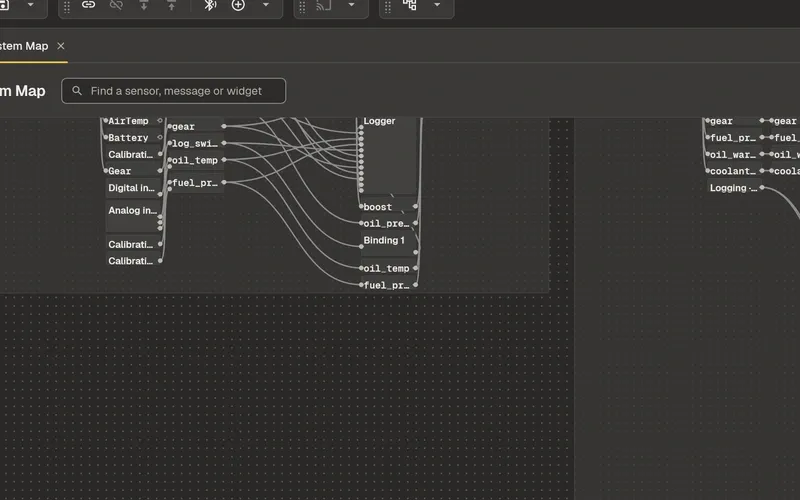
Every unit, input, message, sensor and gauge widget, and the wires between them. Draw a wire to connect two things.
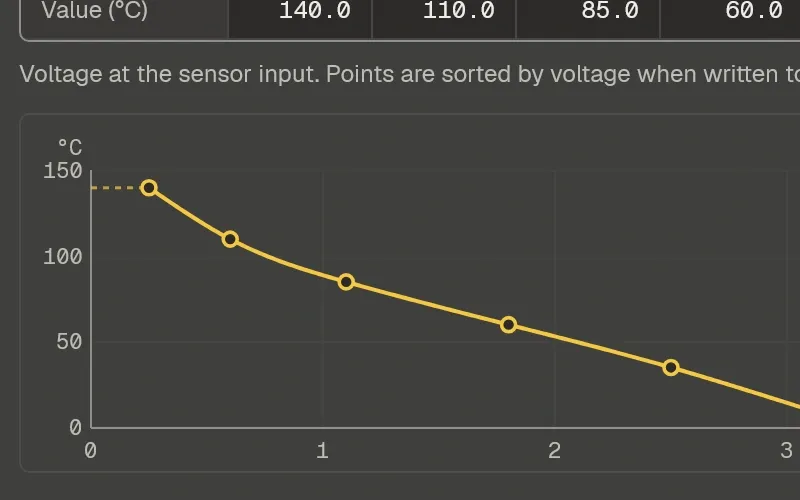
A lookup table (LUT) for each input: type in the points from a sender's data sheet and see the curve the unit reads it by.
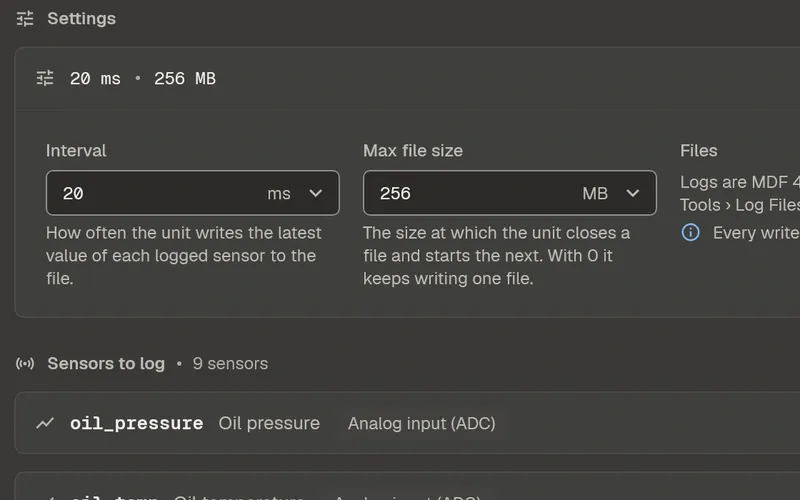
Pick the sensors, how often they are written and what starts a log. Then plot the logs in the same app.
Inputs, calibration tables, bus messages, gauge screens and logging are all settings in the app.
A math expression on any sensor: scale it, combine it with others, or turn a value into a warning.
x * 4 + 1.6temp > 90 ? 1 : 0
Lua on a sensor or on a bus message, running on the unit, for whatever a setting can't say.
The firmware is open source. Developers can build on it, port it to other hardware and run it in a simulator.
the firmware, and its docsstep 3 · a sensor script, from the firmware docs
function post_process_sensor_value(sensor_id, value)
    if value == nil then
        return nil
    end

    local rpm = get_sensor_value("engine_rpm")
    if rpm == nil then
        return -1 -- the other sensor has no value yet
    end

    return math.min(value, 100.0) * rpm
endrunning
What this page describes runs on it today, except where it says planned.
built
Windows, macOS and Linux. Its first release is being prepared.
in development
For Android and iOS.
in development
The units are being designed. The waitlist sees them first.
Eerie Leap is still being built, and this site went up before it was finished. It grows as the product does.